AI and review
Ask AI and what comes back
The AI is a reviewer with a pen it cannot use. It reads the draft, proposes changes and questions, and every one of them waits for a person.
Three ways to ask
- About the whole draft
- Type it in the Scopeleaf AI panel beside the document and press Ask AI.
- About a passage
- Select it and pick Ask AI from the selection tools.
- About a paragraph
- Hover it and use the handle that appears in the left margin.
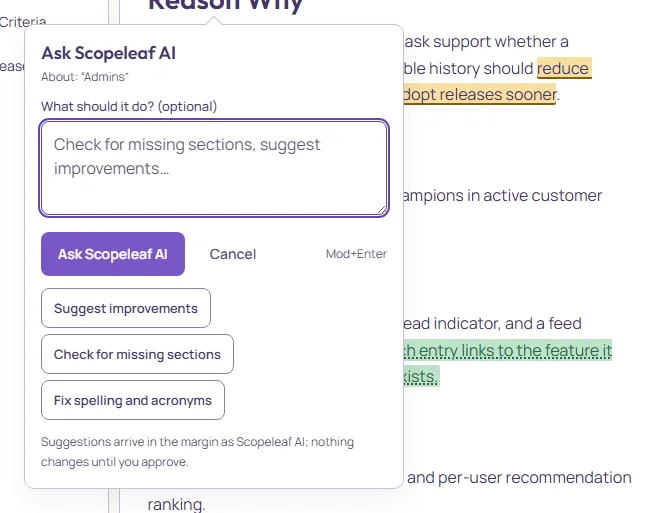
Type what it should do, or press one of the quick actions, which are also listed in the Scopeleaf AI panel: Summarise this document, Suggest improvements, Check for missing sections, Fix spelling and acronyms. Each comes back as ordinary suggestions. Mod+Enter sends from the field. While it works, a small flag marks the block it was asked about and the activity log says it joined.
What comes back
Suggestions arrive in Review changes, each with the change and, when the AI gives one, its reason, drawn inline in the document as before-and-after. Questions arrive as comments, and what a colleague types, when they are neither the host nor the operator, arrives there as their own suggestion. Nothing changes until someone approves; see Review changes: suggestions and comments.
Approved AI text is marked as AI-written and reviewed. AI text nobody has read is shaded and counted in the header until someone marks it reviewed or edits it.
Tidy a whole ticket
More → Tidy with AI… reads the whole Draft once and proposes three kinds of change: removing a fact said twice, marking two places that disagree, and cleaner wording. The host or the operator asks; after an import the same offer opens once on its own.
Cost: about 0.6 points from the host’s balance for a ticket of a few pages, at most 2.2; about 6.2 points for the longest, read in three parts, at most 10.7. The dialog shows the price of yours before anything runs. Time: usually a few seconds, up to a minute for the longest.
The proposals arrive in Review changes grouped by section. Approve or reject a section with its ✓ and ✕, or select several and decide them at once; a conflict is a comment and is never applied. Hovering a section lights it in the document.
A long ticket is read in up to three parts, cut at its sections, so across two parts only a sentence repeated word for word is found. If a part is not read, the group and Activity say which sections and why.
When the AI is not available
If the AI cannot produce suggestions, the sheet says so and the draft is untouched; try again in a moment. A review spends less than one AI point; see Plans, points and billing.
The AI reads the headings to know which section it is in. A draft with the template’s sections gets sharper questions than a wall of paragraphs; what else it reads, and how to hand it documents, is under Giving the AI context.