Editor
Lists and tables
Acceptance criteria are a list; a rollout plan is a table. Both are first-class blocks that export to Markdown as what they are.
Three kinds of list
Bullet (Mod+Shift+8), numbered (Mod+Shift+7) lists are Bullet list and Numbered list on Tools; the task list (Mod+Shift+9) is Checklist in the Insert menu. Press the button on a paragraph to make it an item, and again to turn the item back into a paragraph. Typing -, 1. or [ ] and a space at the start of a line does the same.
A task item has a checkbox anyone in the document can tick; the export writes it as - [x] or - [ ].

Nesting and leaving a list
- Tab
- Nests the item under the one above.
- Shift+Tab
- Lifts it one level.
- Enter
- A new item. On an empty item, ends the list and gives you a paragraph.
- Backspace
- At the start of an item, turns it back into a paragraph.
A list can hold another list, and a task list can hold tasks; a list cannot hold a table or a heading, and the editor will not let you paste one in.
Tables
Table in the Insert menu on Tools adds three columns by three rows, the first row a header. While the cursor is in a table, a Table menu joins Insert and Outline on that card:
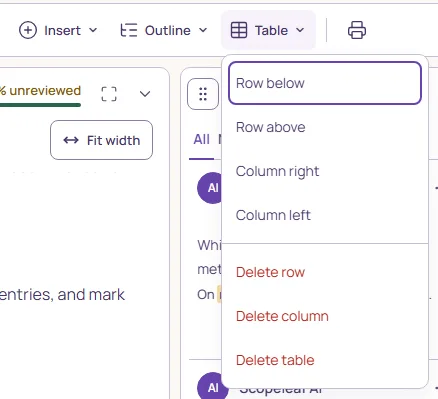
- Row below, Row above
- Add a row next to the cursor’s. Above is unavailable in the header row.
- Column right, Column left
- Add a column next to the cursor’s.
- Delete row, Delete column
- Remove the cursor’s row or column. The header row and the last column stay: delete the table instead.
- Delete table
- Removes the whole table.
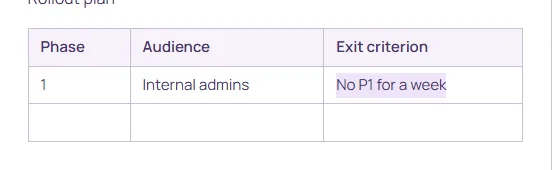
Tab moves to the next cell and Shift+Tab to the previous one; from the last cell, Tab leaves the table. Enter goes to the cell below and, from the last row, adds a row. Cells hold text with formatting; a list or a heading cannot go in a cell.
Merged cells
Cells do not merge. Markdown tables have no merged cells, and a ticket that needs them is usually two tables. A pasted table with merged cells is split into single cells, every cell’s text kept, and a notice says so; see Paste and import.