Editor
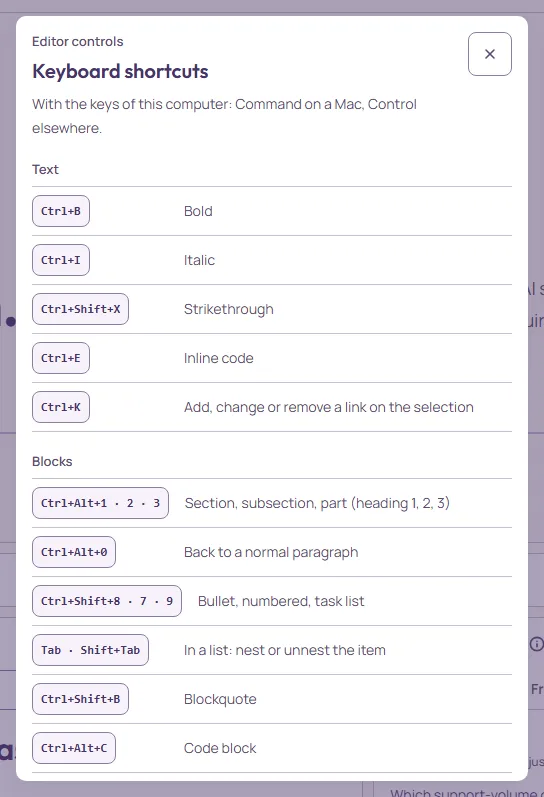
Keyboard shortcuts
Mod is Command on macOS and Control on Windows and Linux. Press ? anywhere outside a text field to see this list inside the editor.
Text
| Mod+B | Bold |
|---|---|
| Mod+I | Italic |
| Mod+Shift+X | Strikethrough |
| Mod+E | Inline code |
| Mod+K | Add, change or remove a link on the selection |
| Mod+click | Open the link under the pointer in a new tab |
Blocks
| Mod+Alt+123 | Section, subsection, part (heading 1, 2, 3) |
|---|---|
| Mod+Alt+0 | Back to a normal paragraph |
| Mod+Shift+879 | Bullet, numbered, task list |
| TabShift+Tab | In a list: nest or unnest the item |
| Mod+Shift+B | Blockquote |
| Mod+Alt+C | Code block |
| Shift+Enter | Line break inside the paragraph |
History
| Mod+Z | Undo |
|---|---|
| Mod+Shift+ZMod+Y | Redo |
Tables
| TabShift+Tab | The next or previous cell; from the last cell, out of the editor |
|---|---|
| Enter | The cell below; from the last row, a new row |
Review and AI
| Mod+Alt+M | Comment on the selection, or on the paragraph at the cursor |
|---|---|
| Mod+Shift+M | Show or hide Review changes |
| Mod+Shift+A | Show or hide the Activity panel |
| Mod+Shift+E | Mark the AI text at the caret as reviewed |
| Mod+Enter | Submit the open Ask AI or comment composer |
Everywhere
| Mod+Shift+Enter | In the wide workspace: focus the current window or restore the layout |
|---|---|
| ? | Open this list (outside a text field) |
| Escape | Close the top layer or exit focus mode |
In the editor
Inside a table, Tab moves between cells instead of nesting; inside a code block, the formatting keys do nothing, on purpose.