GrillMe
Discussion, Explore and vocabulary
Around the question card sit three helpers that do not answer questions: a place to ask the AI back, a deeper look at the options, and the list of terms the team has agreed on.
Discussion
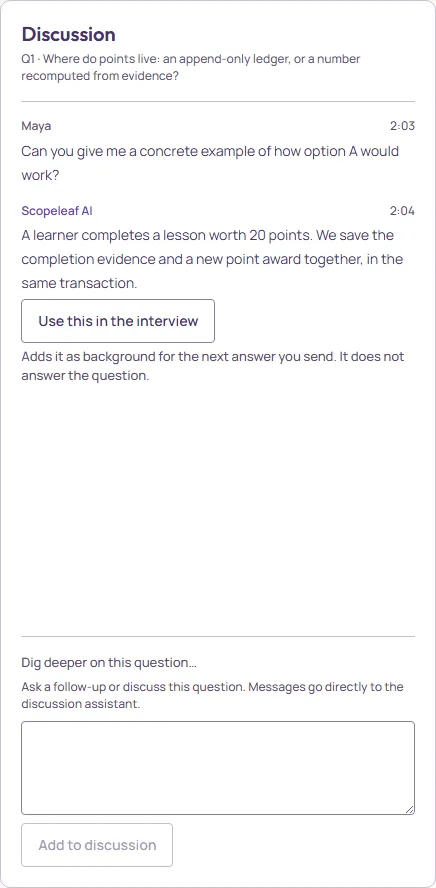
The right column is a conversation with the discussion assistant about the current question. Anyone types in Dig deeper on this question… and presses Add to discussion; the reply arrives under it, addressed to the whole team. If a reply fails, the message is kept and can be asked again.
Two kinds of text live here, and the interviewer treats them differently. Everything a person writes in the Discussion is passed to the interviewer, with the author’s name, when it composes the next questions, so an objection raised here is not lost. The assistant’s replies are not, unless the operator adopts one with Use this in the interview: that adds the reply as background for the next answer sent. Neither is an answer to the question, and the panel says so.
Explore deeper
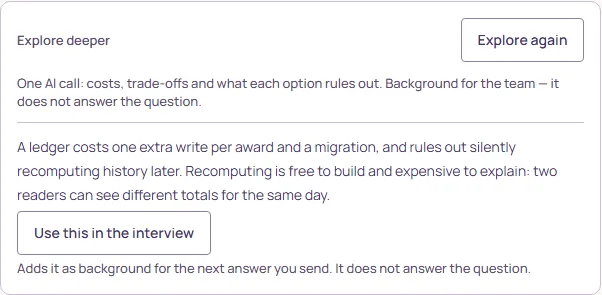
Explore this question asks the AI for costs, trade-offs and what each option rules out. Anyone can press it once the interview is running; it costs one AI call and the result appears under the card for everyone. It is background for the team, not an answer: the operator can Use this in the interview, or the team can read it and choose an option themselves.
Shared vocabulary
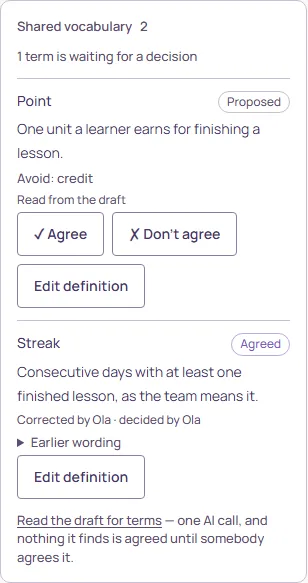
The left column collects the words the ticket depends on, each with a definition and, where useful, words to avoid. A term arrives in one of three ways: the interviewer proposes one, a participant proposes one, or Read the draft for terms asks the AI to read the draft once and list what it finds. Nothing it finds is agreed until somebody agrees it.
- Agree · Don’t agree
- The operator’s decision on a proposed term.
- Edit definition
- The operator rewrites the definition and agrees it in one step (Save and agree).
- Suggest a correction
- Everyone else proposes a better wording; the operator decides. A correction to an already agreed term does not undo the agreement.
- Earlier wording
- Every previous version, with who wrote it.
Agreed terms travel with the interview into the refined ticket, so a definition settled here is not argued again in review. The same words are what the AI uses when it proposes the ticket; see Finishing, and the review.