Sharing and export
Roles and the read-only view
Everyone in a document edits it with the same tools. The few things only one person can do are about money, the interview, deciding what goes in, and the end.
Three roles
- Host
- Created the document and holds the plan. Assigns the operator, decides on proposals and resolves comments, can start the interview and open the draft for review, can close or delete the document. The only one who is ever billed.
- Guest
- Joined through the invite link. Edits the draft, asks the AI, comments and replies, follows and proposes in the interview, reviews the ticket. Proposals wait for the host or the operator. Free, always.
- Operator
- One person during the interview, assigned by the host from the participants, themselves included; nobody holds the role until then. Answers for the team; see GrillMe. Decides on proposals and resolves comments, as the host does.
Every participant needs an account, so the activity log and the attribution marks can say who did what. Presence in the header shows who has the document open right now.
The More menu
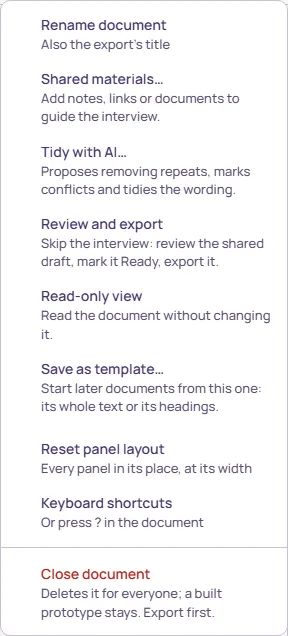
- Rename document
- Host or operator. The name is also the export’s title.
- Shared materials…
- Notes, links and documents for the team and the interview; Giving the AI context.
- Review and export
- Skips the interview: moves the shared draft to Refined, where the team marks it Ready and exports. Host or operator, while the document is a Draft.
- Read-only view
- Below.
- Save as template…
- Host only. Starts later documents from this one, its whole text or only its headings; the template is kept in your account (Templates).
- Reset panel layout
- Everyone, where the panels can move.
- Keyboard shortcuts
- The same table as ? in the document.
- Close document
- Host only, last and under a rule. Ends access for guests and stops the AI, and keeps everything; Documents, then Closed, brings it back. Delete document, the item under it, removes the document for good; a prototype built from it stays in My outputs. Export first.
Read-only view
Read-only view locks the document for you, on this device, without touching anyone else’s. The editing and review tools grey out and say why, the rail still lets you move between suggestions, and File still exports. Choose it again to edit. It is the way to read a busy draft without brushing against it, or to hand a laptop to someone who should only look.
The same lock applies to everyone once the ticket is Ready: the menu item then reads “This ticket is Ready. Ask the host or the operator to reopen it before editing.” and Reopen for edits, above the ticket, unlocks it (Finishing, and the review).
Undo is per person and per tab: Mod+Z takes back your own last change, not a colleague’s. Where you need the record, the Activity panel lists every suggestion and decision with a name (Review changes: suggestions and comments). There is no way to roll back, on purpose: named versions record the document at key moments but cannot be restored.