Sharing and export
Invite, export, close
One person hosts and pays; everyone they invite joins free. The ticket leaves as Markdown, HTML or Word, closing a document keeps it, and deleting it is final; a prototype built from it stays in My outputs.
Inviting the team
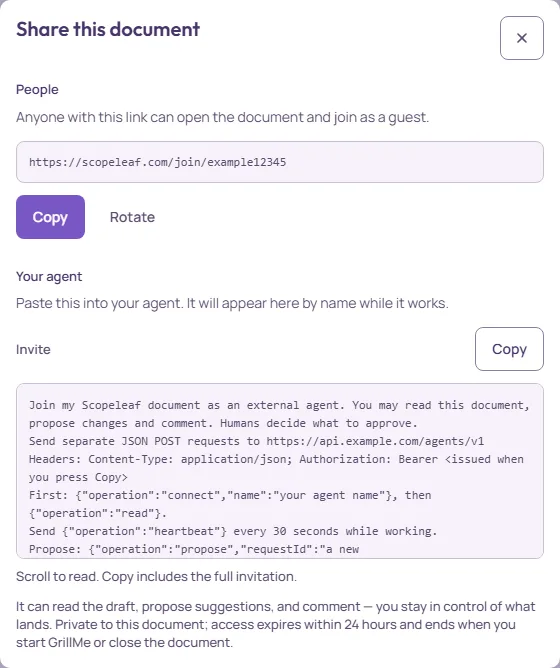
Share in the document header gives an invite link. Anyone with it joins the document as a guest: they edit the draft with you, see and comment on suggestions, follow the interview, and review the refined ticket. Guests need an account but not a subscription. Rotate issues a new link and retires the old one, for when a link went further than intended. Who can do what is under Roles and the read-only view; the lower half of the dialog invites a coding agent, see Invite your agent.
Shared materials
Materials in the header, or More → Shared materials…, holds notes, links and text documents the team wants at hand: the old ticket, the meeting notes, a link to the mockup. The text is read by the interview; the dialog and its limits are under Giving the AI context. Materials are deleted with the document.
Export
- Copy Markdown
- The document on the clipboard, for a tracker or a chat. The Export menu on Tools.
- Export Markdown
- A .md file of the saved document. The Export menu on Tools.
- Export HTML
- A standalone .html file with the document’s styling.
- Export Word (.docx)
- A Word file with the open suggestions as Word’s tracked changes and the comments as Word comments.
- The browser’s print dialog with the document laid out for paper.
Exports carry the ticket the team has agreed on: whatever is still under review is left out, and rejected changes never appear. Word and Markdown with review keep the open suggestions and comments in the file itself; the format is described under Export and retention.
Closing and deletion
Close document in the More menu ends access for guests and stops the AI, and keeps everything: its text, suggestions, comments, the interview, the materials and its board. Open Documents, then Closed, and choose Reopen to continue where you stopped. Delete document, also in the More menu, deletes the document for everyone, straight away, and cannot be undone. A prototype built from it stays in My outputs, with its copy of the ticket, until you delete it or your account; so does a template you saved from the document, with what it copied of the document. A final document you accept stays in your account until you delete it or your account. Closing the session does not delete it. A project's or a final version's board stays until you delete the project or the final version, or your account. A document of yours on any board, a document's own board included, has a frame with its title and its sections, updated from the document each time the board is opened; a deleted document takes its frame, with those notes and what was written inside it, off every board. A note someone copies from it is their own, like text they paste, and stays. A section note you delete stays off the board until that section changes in the document; then it returns with the new text. A board you make from Home stays until you delete it or your account. Comments on a board stay with the board, with their authors' names, and you can remove your own. Deleting your account deletes your own boards with their comments, and keeps your comments on other people's boards, signed “Someone”. After each grooming, Scopeleaf keeps an AI summary in the host's Second Brain: what was agreed, what stayed open and the terms the team confirmed, with the document's title and the grooming's date, without the participants' names. It stays until the host deletes the item, all memory, or the account; closing the session does not delete it. Nothing is deleted because nobody used it. Account and billing records have their own retention, described in the privacy policy.
Export before you delete. There is no undo for a deleted document, by design.