AI and review
Giving the AI context
The AI knows only what is in the document. Better input is the whole trick: a structured draft, the documents the team is working from, and a sentence about what you want.
What it reads
- The draft
- As Markdown, up to its first 24,000 characters (about twelve pages); a longer ticket’s tail does not reach the AI. Headings tell it which section it is in, so a suggestion lands in the right place and a question is about the right thing.
- The selection
- Ask AI from the selection tools or a paragraph handle sends that passage, up to 4,000 characters, as the subject; the draft stays as background.
- Your instruction
- The optional field in the Ask AI sheet, up to 1,000 characters. One sentence about what to look at or what you want back is enough.
- Shared materials
- Text you add to the document (below). The interviewer reads them; a link without text is kept as a reference only.
- Agreed terms
- During and after the interview, the shared vocabulary defines the team’s words for it.
What it does not read: other documents, your account, anything on the web. A document is the whole world, and it is deleted with the document.
Shared materials
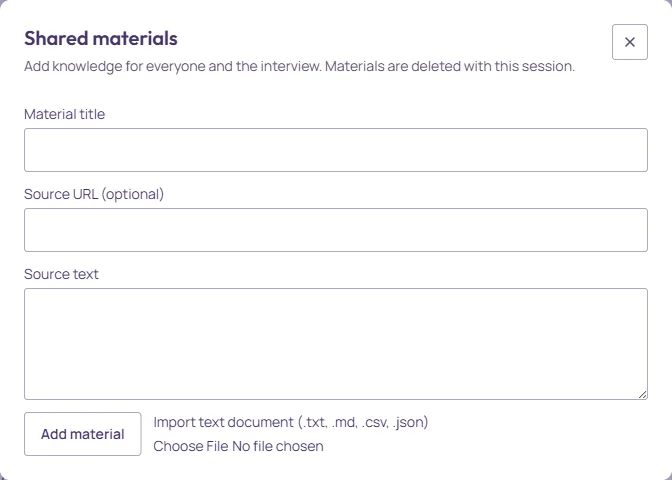
Materials in the document header (with a count) or More → Shared materials… opens the dialog. A material has a title, an optional source URL, and text. Type or paste the text, or Import text document: a .txt, .md, .csv or .json file up to 2 MB and 40,000 characters, saved as UTF-8. Each material shows whether it is Supplied text available to the interview or an Unread link · reference only: the AI does not fetch links, so paste the text you want it to have.
Materials are for the team as much as for the AI: the old ticket, the meeting notes, the spreadsheet of numbers. They are deleted with the document.
Writing for the AI
Three habits make a difference. Keep the template’s headings, or add your own with the Outline menu on Tools (Templates). Put constraints in the text, not in your head: a rollout rule written into In Scope becomes an acceptance criterion instead of a question. And use the quick actions for the common asks, such as Check for missing sections and Suggest improvements; they send an instruction tuned for each (Ask AI and what comes back).
The AI is a reviewer, not a source: it can tell you what the draft does not say, and it cannot tell you what your customer wants. Materials from the people who know are the fastest way to sharper suggestions.